

The story
Why we are becoming Elari
For more than 25 years we have moved with the way organisations handle their spending. From the cash book in the drawer, to digitising, to complete processes that run automatically. That development does not stop. We choose to stay out in front rather than join at the back.
That calls for a name that can carry the story. Until 1 October we had two: Visma | ProActive for the company and Spend Cloud for the software. From 1 October, Elari is the name for both.
We already had a good name. So we made a better one. The same people, the same product, the same approach, and finally a name that fits. And we remain part of Visma.
What Elari stands for
Light, clarity and direction. Elari is built from elevate and light. Together they stand for lightening: bringing clarity as well as making a load lighter. That is exactly the role we want to play.
Spend your time wisely.
Behind that line is what we have been working on for years: keeping the time you spend on admin as small as possible, so more is left for the people who matter. That has not changed. The name simply fits it better.

How to explain it in three sentences
Your customers ask you first, often before they ask us. This is the short version, to use as it is or in your own words.
There were two names, Visma | ProActive and Spend Cloud, and that caused confusion. From 1 October it is one name: Elari. The same software, the same people, the same agreements.
What is not true: that it is a new system, or that features are being added. This is a change of name and appearance, and that clarity is exactly what prevents questions later on. If you want more information, you will find it in the partner toolkit (further down this page) and in the webinar on 6 October.
First this
Prepare now, publish from 1 October
The name and the logo only go public on 1 October. Until then, Elari is not public.
What you can already do
- Prepare your website, documentation, training material, offers and service catalogue in the new name
- Brief your own people
- Answer your customers' questions using the information on this page
What you do not do until 1 October
Publish the name or the logo:
- On your website
- In your social posts
- In your newsletter
- In advertising
If you publish earlier, the brand launches before we do.
What stays the same
This is a change of name and appearance, not a new system.
Your customers work functionally as they are used to, including all integrations.
Data, permissions and workflows remain unchanged.
Contracts remain valid: only the name on them changes.
Support and your regular contacts stay the same people. Our email address is now support@elari.nl. Emails to the old address keep arriving.
What changes
What is new
Our name
Until 1 October we had two names: Visma | ProActive for the company and Spend Cloud for the software. From 1 October, Elari is the name for both. In text you write it with a capital letter.
Elari
Our logo
Our new logo is a wordmark: the name Elari, without a separate icon beside it. In text you write Elari with a capital letter, in the logo without.
Our overall look
New colours and a new design for our web version, app and emails.
In the web version
A number of items are in a different place
The menu: There is now one menu, on the left, instead of a menu plus a bar at the top. The modules are grouped by category within it.
The actions for a screen: Actions that belong to a screen appear as tabs at the top instead of separate buttons. On the coding screen those are, for example, ‘reapply recognition’ and ‘import relations’. This works the same everywhere in Elari, so you always find related actions in the same place and switch with one click.
The filters: The filters are on the right.
Exporting: You now export overviews via a single button. Where you used to choose between three separate buttons (generate PDF, Excel export and CSV export), you now click 'Export' and choose the format there. So you have the same export options, but tidier and in one fixed place.
Help in the menu has a new name
Until now, the Knowledge Base and the chat sat under one button, 'Ask DIRK'. That name disappears and the two become separate items in the menu:
You will find the articles in the Knowledge Base. Under 'Ask Elari' you put your questions about the software to the AI chat; it works exactly as you are used to.
All Knowledge Base articles are updated on 1 October. The content does not change, only the names.
Click an image to view it larger.
The app
The app has a new name and a new icon
 Elari
Your customers have seen Elari in the app since 1 October.
This happens through a mandatory update. If automatic updates are switched off on a phone, the app will ask for it. After the update, the app appears on the device under the name Elari and with the new icon.
Good to know: the app can no longer be found under the name 'Spend Cloud'.
An impression of how the app looks after the update
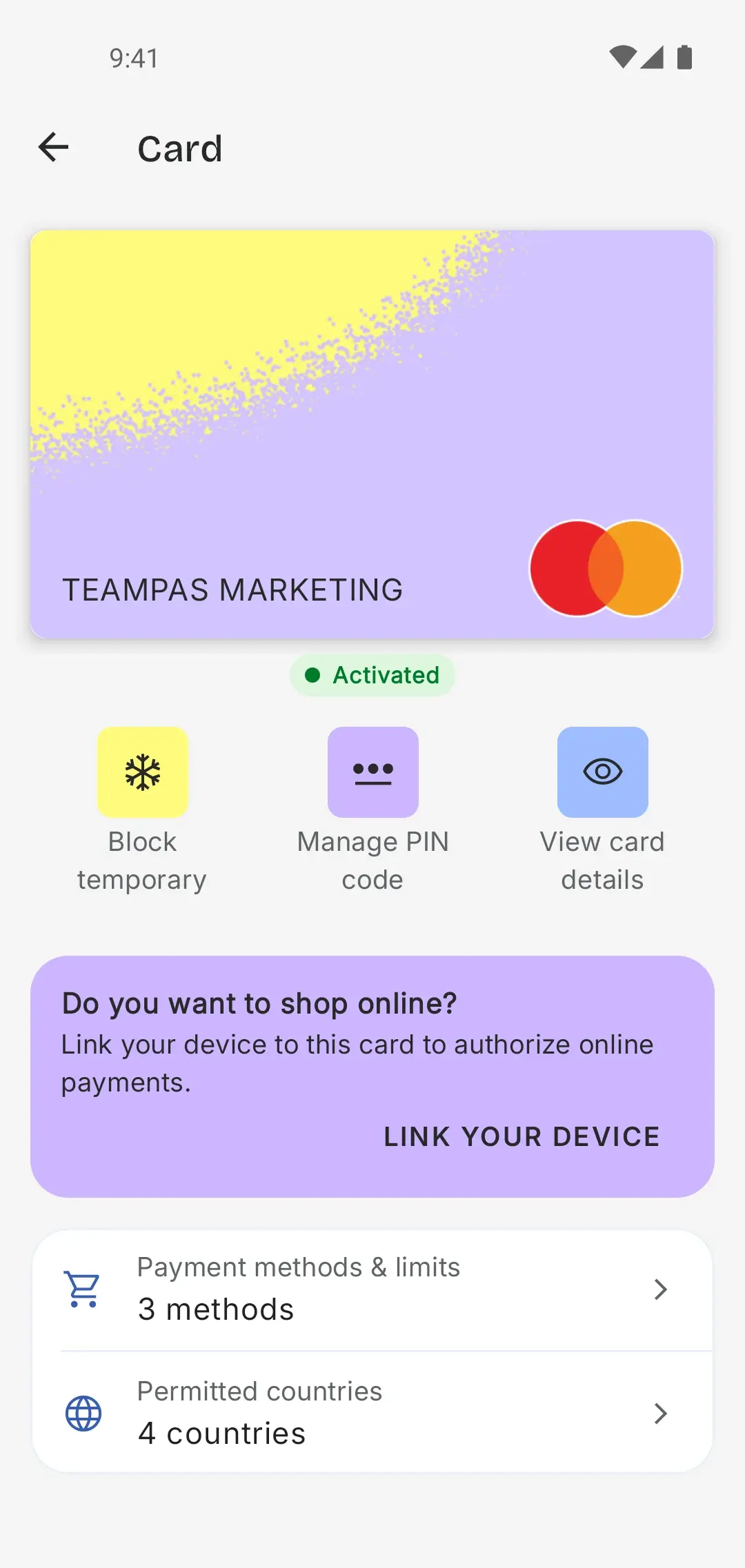
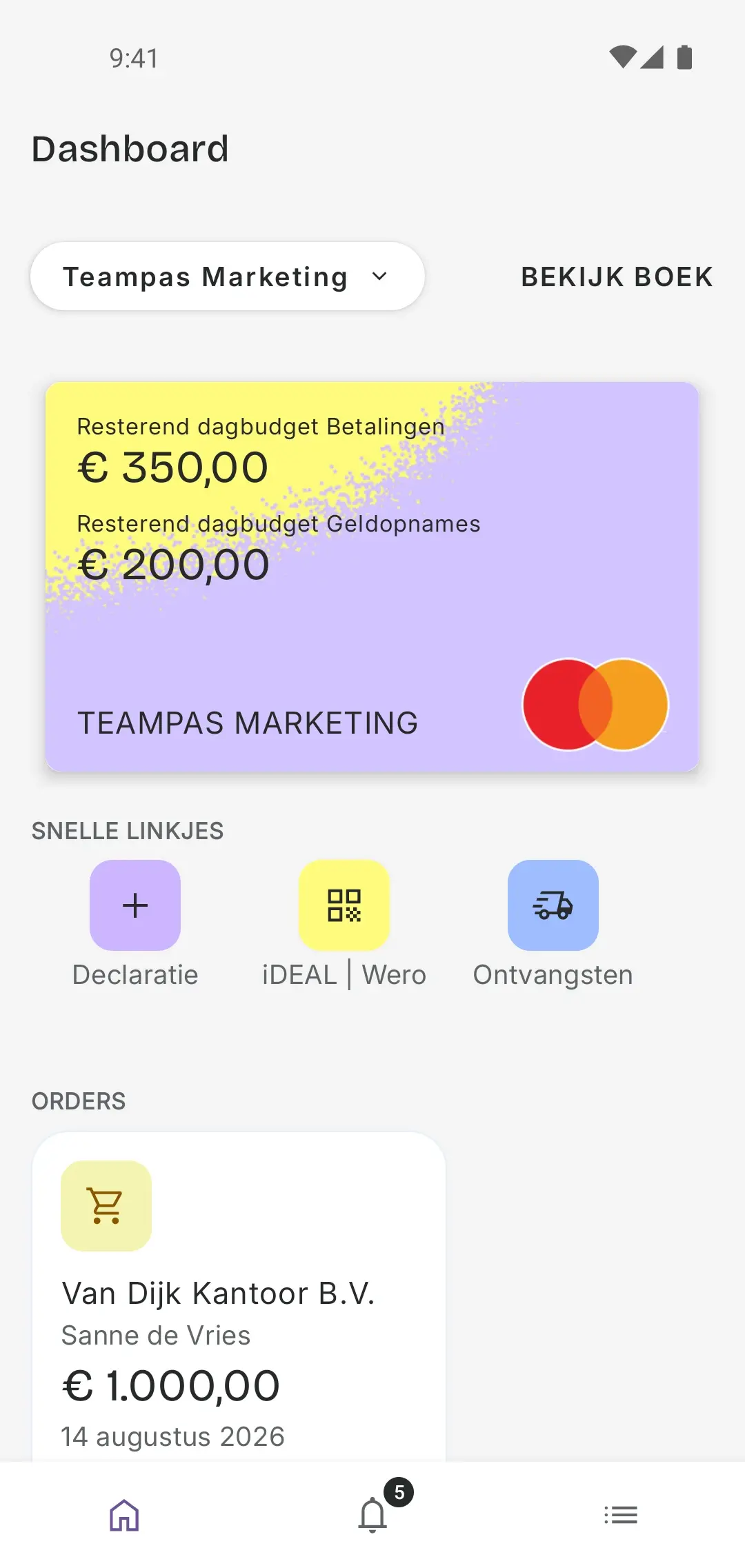
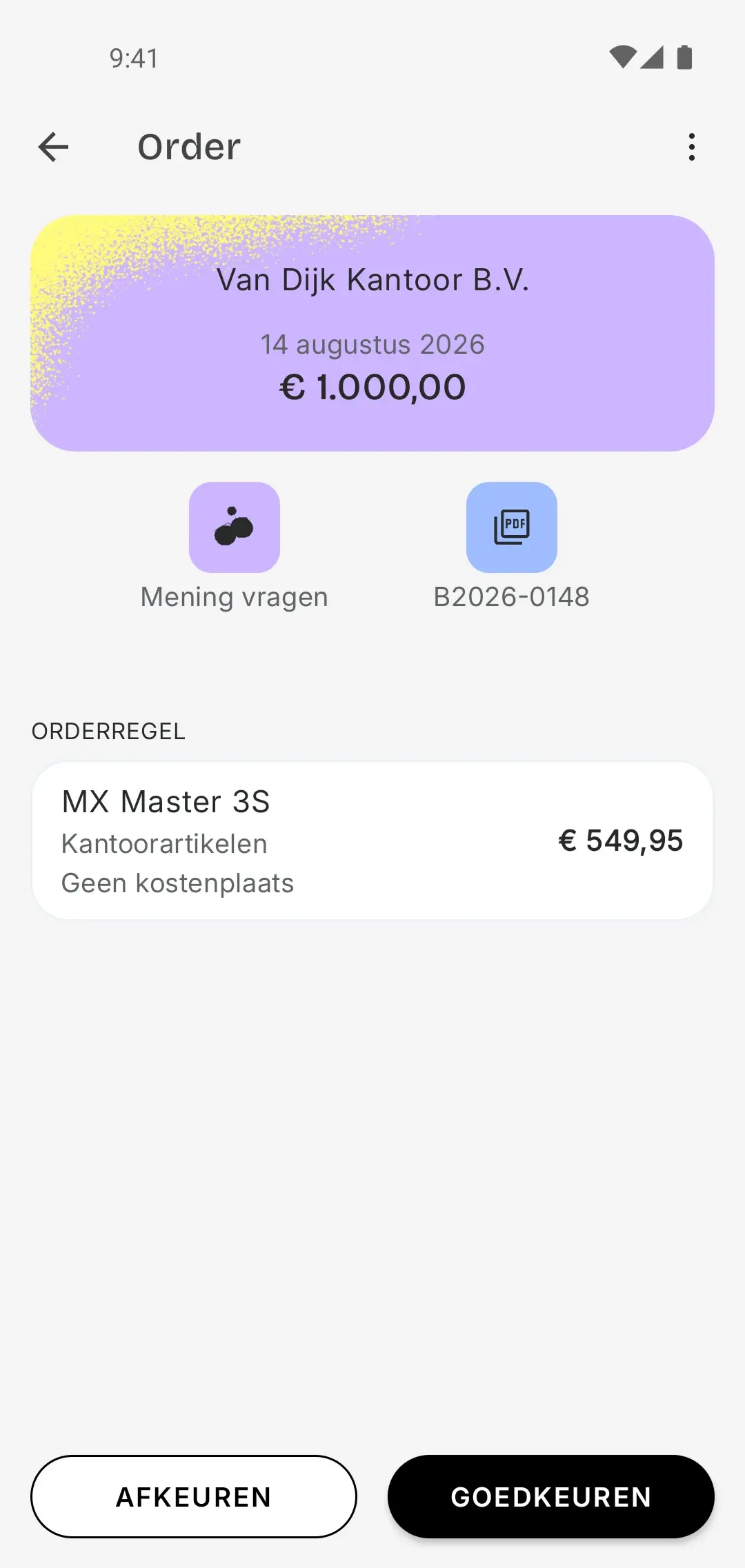
The cards
Spend Cloud Cards become Elari Cards

The cards your customers have now keep working. They do not have to be exchanged and nothing changes about the card details.
From 12 October, your customers order Elari Cards. They look different from the current cards.
Does a customer need cards now already? They can simply order, delivery just takes a bit longer than usual until that date.
A complete overview of where to find everything is in What changes in Elari.

Take a look already
Are you registered as an administrator in an environment yourself? Then from 1 September the 'Try Elari' button appears at the top of your screen, in the blue bar. One click and you see the new view, just for yourself. You can go back via 'Old view', which you will find at the bottom of the menu on the left in Elari. That way you know what your customers will see and you can help them precisely.
On 1 October the choice disappears and everyone works in Elari.
Everyone switches the new view on for themselves; you cannot do that centrally for an organisation. There is no switch in the app: there Elari arrives all at once on 1 October, through a mandatory update.
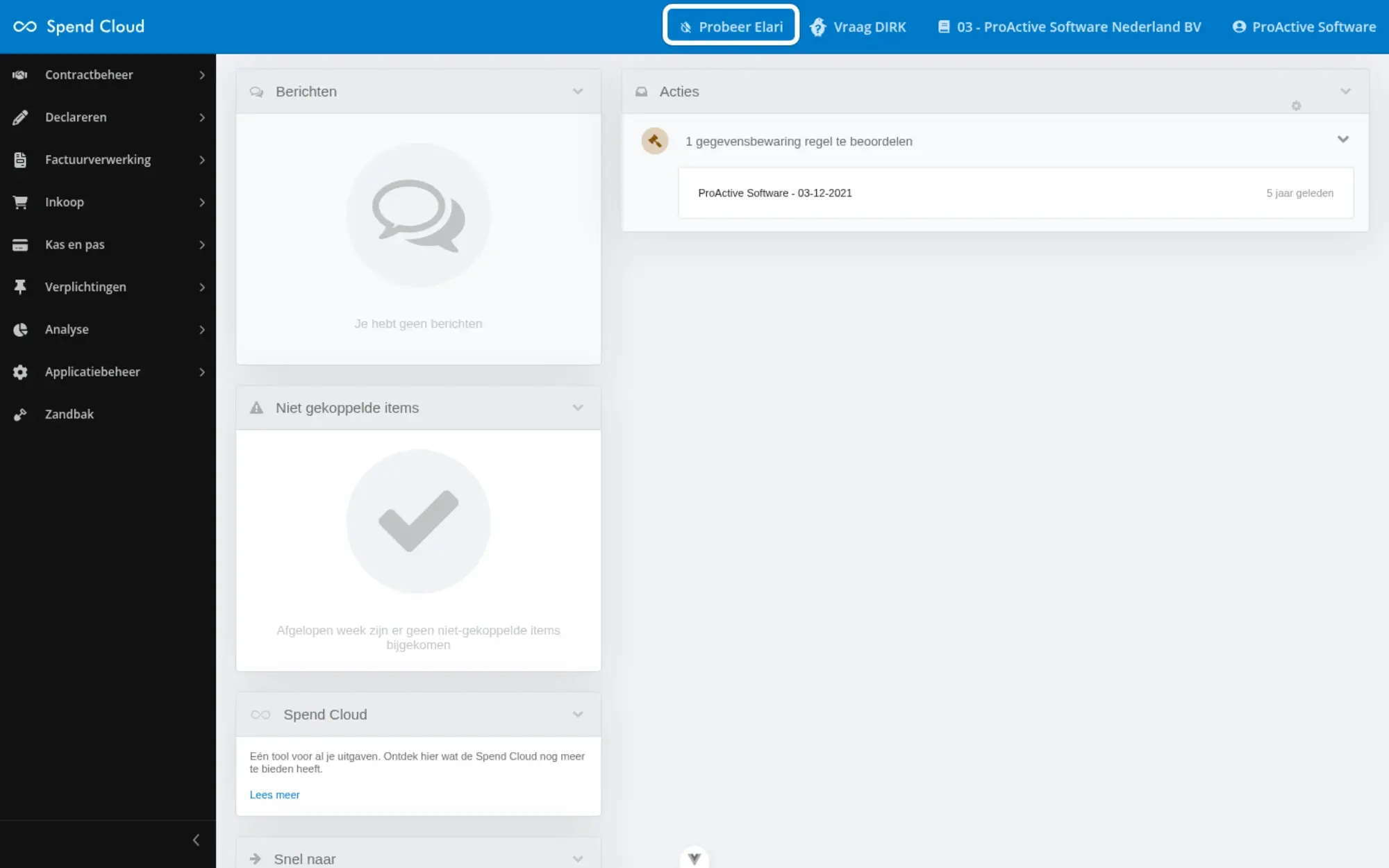
Who sees the button?
Application administrators and module administrators. If a colleague does not see the button, they are not known to us as an administrator in that environment. In Who is an administrator of Spend Cloud? you can read the difference between the two and how to look up who they are in your organisation.
That is the same group that heard from us on 1 September. It also explains why one person has that email and another does not.
Does someone need to be added? You arrange that through the permissions in your own environment. From 8 September the distinction disappears and everyone can switch to Elari.
What your customers get from us, and when
The customers you support are included in our regular communication to administrators and end users. Below is what reaches them and when, so you can align your own message with it. If you are registered as an administrator yourself, you will also see the administrator emails in your own inbox.
1 September
Administrators
Announcement by email and in the web version, with the information pack. The new view opens for administrators.
2 to 11 September
Administrators
A physical mailing on the doormat.
8 September
End users
Message in the app and in the web version. The new view opens for them too.
24 September
Administrators
Substantive reminder: this happens on 1 October, this is what you can prepare.
1 October
Administrators and end users
Elari goes live. The old view disappears and the app gets a mandatory update.
What we do not ask their end users to do: set anything up, install anything or change any data. The only action is the app update on 1 October.
5 things you arrange yourself
What you arrange yourself
Most of it happens by itself. Your current web address stays reachable and you are redirected automatically to [environment].elari.app.
Do you manage environments for your customers? Then go through the same points as an administrator. Do you also have your own environment with us? Then they apply there too.
You arrange these things yourself, together with your own IT or your suppliers. That usually takes more time than expected, so we recommend starting now.
Also worth doing
These two do not apply to every organisation, and nothing breaks if you skip them. They do save you questions afterwards.
What you get from us
The partner toolkit
What changes and what stays the same, the timeline, the checklist and an overview of what we send to administrators and end users. Plus material to forward to your customers: an announcement, a message to your customer's administrator, a text for an intranet or email and an overview of what changes for users. Use it as it is or as a basis for your own message.
One point of contact
Do you still have questions that are not in the toolkit or on this page? Then get in touch with our Partner Manager, Gerjan Roepers.
Frequently asked questions
Can I use the name and the logo?add
Yes. Since 1 October Elari is public, so you can use the name and the logo everywhere.
What do I say if a customer asks about it?add
You may share everything on this page with your customers. Administrators were informed on 1 September and end users on 8 September, so you can talk about it freely.
Does anything change about how we work together?add
No, nothing changes there. The same people, the same agreements and the same contacts.
Does our contract change?add
Your contract remains valid with the same legal entity; only the name on it changes. The chamber of commerce number, the VAT number and the bank account number stay the same. Our invoices are issued in the name of Elari.
Where do I send my questions?add
Feel free to ask Gerjan Roepers. If you are in an ongoing implementation project, your consultant helps you as always; for an outage you can turn to support. Our support address becomes support@elari.nl; email to the old address keeps arriving.
Does the web address of the environments change?add
Yes, that changes. From 1 October an environment ends in elari.app instead of spend.cloud. The old address forwards automatically, so you have time to update your bookmarks and your own documentation.
Do my customers get their own material from us?add
Yes, administrators received an information pack with ready-made texts on 1 September. You have that same set, so you know exactly what your customers receive.
Do my customers' cards still work?add
Yes, they keep working. The card details stay the same and there is no need to exchange them. From 12 October, you order Elari Cards. Ordering now is possible too, delivery just takes a bit longer than usual until that date.
Can we go back to the old view?add
No. Since 1 October everyone works in Elari.
Where has DIRK gone?add
DIRK disappears as a name, but everything is still there. You will find the articles in the Knowledge Base and the AI chat under 'Ask Elari'. All Knowledge Base articles are updated on 1 October: the content does not change, only the names.
I have come across something that is not right. Where do I report it?add
Let us know through your consultant if you are in an ongoing project, and otherwise via support. Mention where you came across it and what went wrong, preferably with a screenshot.
Questions?
Get in touch with Gerjan Roepers, Partner Manager.
Call 06 10 00 24 82, or email gerjan.roepers@visma.com.